DNSSEC - information and setup
DNSSEC - Domain Name System Security Extensions is an extension of the DNS system that verifies the authenticity of records received from DNS (prevents spoofing)
Info: Spoofed sites are very difficult for users to identify. The user enters mydomain.com in the URL address and the computer asks the DNS server for the IP address of the specified domain. An attacker downloads the contents of the domain and overwrites specific DNS records. The user has no idea, because the URL line still shows mydomain.com and the actual content is still displayed. An attacker would then gain all used user data.
DNSSEC uses asymetric encryption. Owner generates two keys, private one and a public one. Private key is used to sign informations about his domain, which are saved in DNS. The public key is used to verify authenticity of the signature. This key is stored with the parent authority of the domain.
To activate DNSSEC for your domain, follow the simple tutorial below:
1. Logging into administration
Log into administration admin.hukot.net.
.png)
2. Choose your domain
Choose tab "Domains".

3. Activating DNSSEC
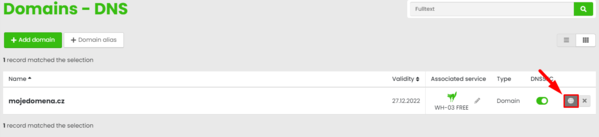
Choose your domain from the list and click on button "Edit DNS".
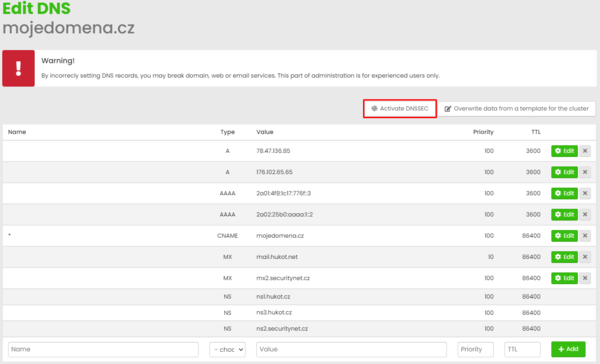
We can see all the DNS records for the domain. There' a button "Activate DNSSEC", click on it and confirm.
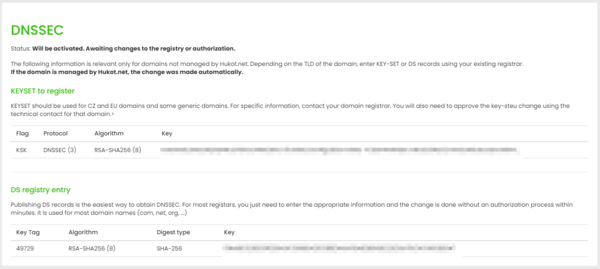
DNSSEC has been successfully activated. We need to wait for DNS to refresh now.
For domains outside hukot.net it's needed to enter "KEY-SET" or "DS" record, depending on top level domain at your current registrar. All the necessary information will be displayed after clicking on "DNSSEC".
We're done! :)