Testing connectivity speed using GRML
In this tutorial we're going to show you how to check your connection speed for your VPS.
Turn off the VPS through admin.hukot.net. Next step, mount GRML (Live Linux) using option Mount ISO with OS setup.
After mount the ISO we're going to turn on the VPS and open VNC console. Next display Boot Menu by pressing Esc and choose option with DVD/CD.
On GRML home page select first option by pressing Enter.

After the first option shows, press button n to configure network.
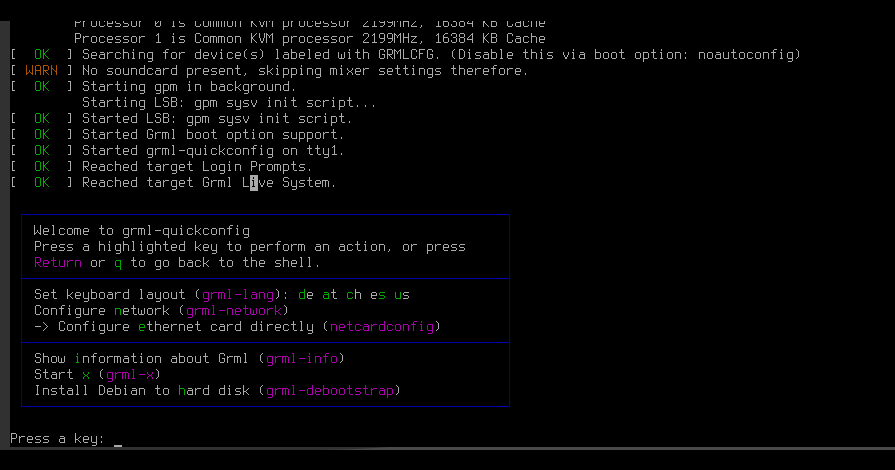
Now choose netcardconfig. We're going to setup network using the configurator.
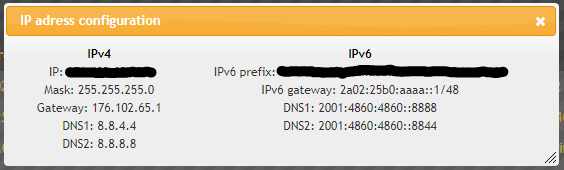
You can find all the needed information in admin.hukot.net in tab Virtual datacenter by clicking on your IP.
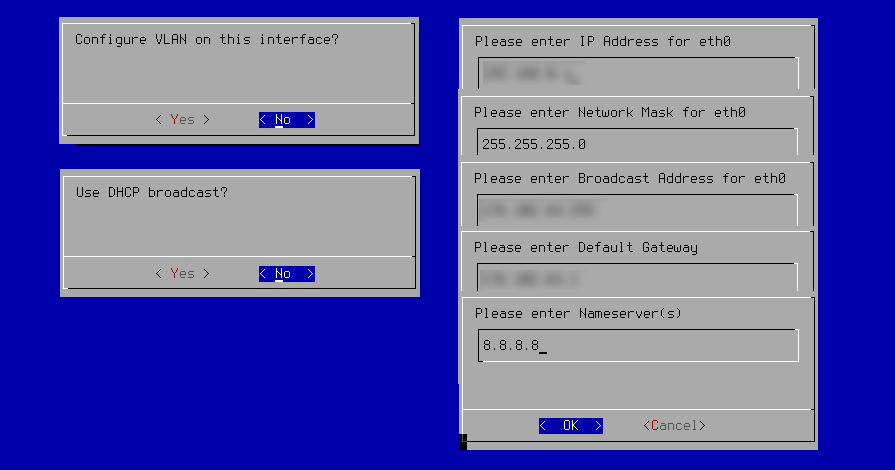
- Configure VLAN on this interface? => No
- Use DHCP broadcast? => No
- Please enter IP address for eth0 => Your IPv4 address from admin panel
- Please enter Network Mask for eth0 => Leave as it is, continue with OK
- Please enter Broadcast Address for eth0 => Leave as it is, continue with OK
- Please enter Default Gateway => Your Gateway from admin panel
- Please enter Nameserver(s) => Enter 8.8.8.8
After completing all the steps, it will ask us if we want to start the interface automatically at OS startup, we can continue by selecting no and quiting the configurator.
Now we need to download speedtest-cli, we're going to do that using following command:
wget -O speedtest-cli https://raw.githubusercontent.com/sivel/speedtest-cli/master/speedtest.py
chmod +x speedtest-cli
chmod +x speedtest-cli will enable launching the downloaded script.
To use speedtest-cli we're going to use following command:
./speedtest-cli
Speedtest is going to select its testing server and will proceed with testing upload and download speedst.
More about speedtest-cli.
Now you know the connection speed of your VPS :)