WordPress - web health
How to achieve good condition of a WordPress website from the perspective of internal web health evaluation directly in WP? Just make a few settings, and you can achieve a "great" rating.
Site Health
You can find this function in the WordPress CMS administration in the sidebar menu: Tools -> Site Health.
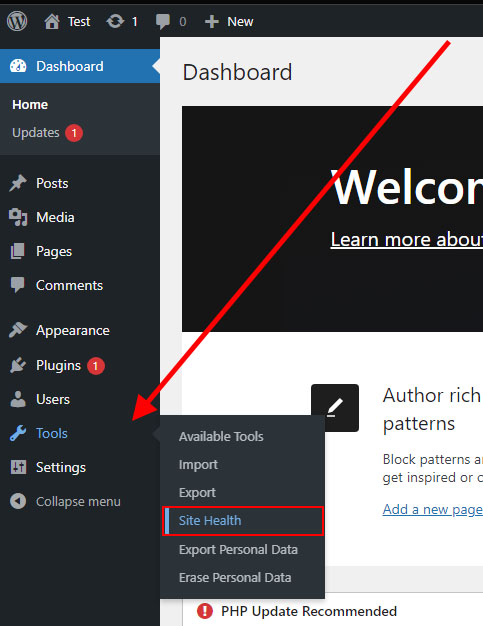
After displaying Site Health, you will see a basic overview divided into two parts: Status and Information. We will look at the Status tab and its functions. The initial view of the tool may look like this:
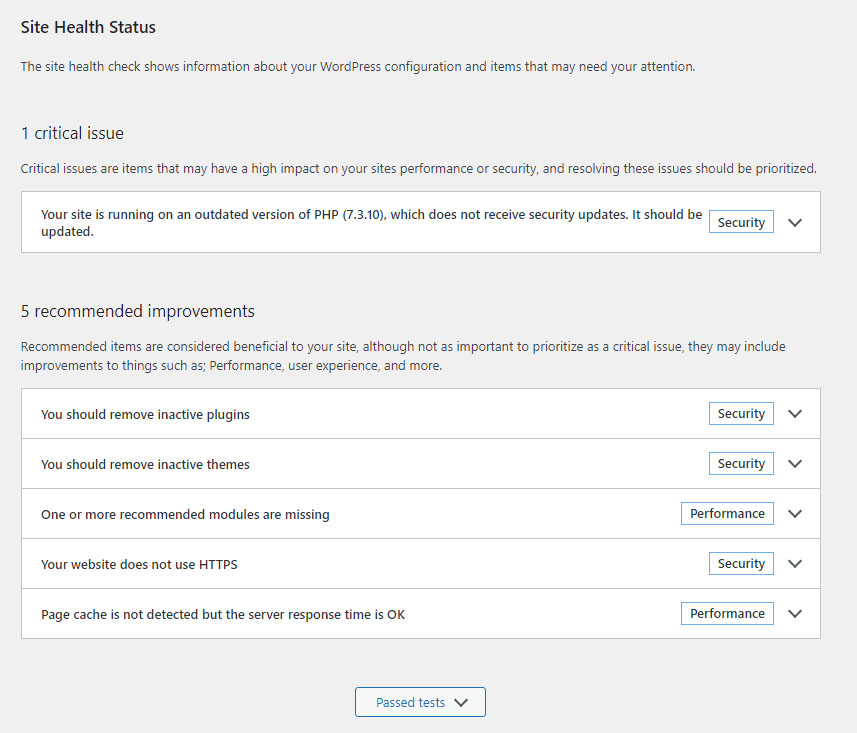
What the Site Health Plugin Checks
- PHP Version: Check if your site uses the minimum required PHP version and also recommends a newer version if it's older than the recommended one.
- MySQL Server version: Checks if the database your site uses is on the minimum required version (it supports MySQL and MariaDB, which are the two officially supported database engines).
- JSON Extension: Many functions in WordPress, as well as plugins and themes, work with data in a format known as JSON. This check determines whether it's enabled for your site.
- MySQL utf8mb4 support: Since WordPress version 4.2, it supports utf8mb4 as the database character set. This allows the use of various advanced characters on your site, such as Han character sets.
- Communication with WordPress.org: Checks the functionality of your site's communication with the WordPress.org server so that you can download and update templates and plugins.
- HTTPS Status: Checks whether your site operates on a secure connection.
- Secure communication: Checks whether your website can communicate with external services using a secure connection (SSL). Many services require secure communication and it can affect various plugins.
- Scheduled events: Checks if the WP Cron service is running and functioning as it should. If it's not working, scheduled tasks and updates may not work as expected.
- Background updates: A set of tests to check if anything is preventing WordPress from automatically applying minor updates (security updates/bug fixes).
- Loopback request: Checks if nothing is preventing loopback requests. Loopback is used to run WP Cron, as mentioned above, and it's also used to verify files after updates and can affect many different parts of your website.
How to Address Basic Recommended Improvements
You should delete inactive plugins - If you have deactivated plugins that are not needed and your website is functioning fine, you should delete them. You can remove inactive plugins in the "Plugins" section.
You should use persistent object cache - Hukot.net web hosting supports this feature. You can activate it using a plugin like "SQLite Object Cache," which you can install directly from the WP administration -> Install new plugins.
Page cache was not detected, but server response time is fine - Hukot.net web hosting supports this feature. You can activate it using a plugin like "W3 Total Cache," which you can install directly from the WP administration -> Install new plugins.
Authorization header is missing - To address this recommendation, you can go to the "Settings -> Permalinks" menu and change the "Permalink Structure" to an option like "Date and name."