Cookie bar PRO - implementation
To ensure the proper functioning of the cookie bar, it is necessary to define cookies at cm.hukot.cloud
Panel Installation
In the following steps, we will show you how to implement CL PRO into your system.
Obtaining the Installation Script
To obtain the installation script, open the Domains tab and click on the Panel List button.
For the desired language version in the Token column, click on the link that will open a modal window.
We have two installation options:
- Default Installation
- Google Tag Manager
Default Installation
In the case of the default installation, you need to modify your web presentation.
Copy the implementation script and place it at the end of the document before the closing tag.
Example:

To verify that a visitor has confirmed the CM Panel, look in the Consent Verification section.
Google Tag Manager
If implementing through Google Tag Manager is more advantageous for you, for example, in the case of using CMS like WordPress, Prestashop, etc., we have implementation via this tool.
Template Import
Through the GTM Template button, download the template for import.
You can find the GTM Template button on the implementation page at cm.hukot.cloud.
Import the template in Google Tag Manager via Manager > Import Container.
Select the downloaded file cookie-panel-gtm-template.json, choose the existing workspace, and let the import merge.
Confirm the import of the new template.
Tag Configuration
In the menu, expand tags and click on the New button.
In the Custom category, select Cookie Bar PRO and fill in the token.
Consent Mode Settings
In the tag manager, click on Manager (admin), select container settings, and enable consent overview (enable consent overview).
In the tag settings, you will find a new event:
- Consent initialization - All pages
Consent Update
For cases where you want the tag to be called immediately when the cookie bar is confirmed, you need to create a rule.
Go to Rules, click the New button and select a custom event.
Set the event value to cookie_panel_consent_update and click save.
For all tags that need to be triggered when consent is given, add this new rule.
Activating Scripts on Consent
To run a script after consent is given, you need to modify the current calls of individual scripts as shown in the following example:

Change it to:

You need to change the type attribute to text/plain and add the data-cm-group data attribute with the group type at which the script should be activated. Available groups are:
- necessary - Required
- analytics - Analytics
- marketing - Marketing
- functional - Functional
Consent Verification
The following procedure applies only to PHP implementation.
Implement the following function:
function cookieAgreement($type) { $cookie = isset($_COOKIE['CookiePanel']) && $_COOKIE['CookiePanel'] ? $_COOKIE['CookiePanel'] : ''; return $cookie && in_array($type, explode('-',$cookie)); }
You can specify the following values for the $type variable:
- necessary - Required
- analytics - Analytics
- marketing - Marketing
- functional - Functional
Now, if you want to verify whether a visitor has consented to the analytics group of cookies, use the following condition:
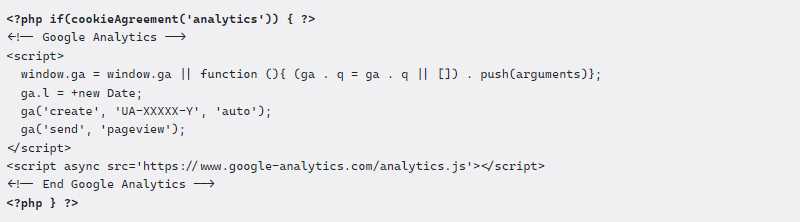
Revoking Consent
CM Panel offers a total of 2 ways to revoke consent:
- Using a data attribute
- Callback
Revocation Using a Data Attribute
Apply the data attribute to a static clickable element:
data-cm-invalidate-accept
<button type="button" data-cm-invalidate-accept>Revoke Consent</button>
Revocation Using a Callback
Apply a callback to an element:
CookiePanel.removeAccept();
<button type="button" onclick="CookiePanel.removeAccept();">Revoke Consent</button>
Jan Vokurka
07.03.2022 15:43:27
Dobrý den, z závodu mi není, prosím, jasné, jestli se to dá aplikovat i na iframe z YouTube. Např. <iframe width="560" height="315" src="https://www.youtube-nocookie.com/embed/id_videa" title="YouTube video player" frameborder="0" allow="accelerometer; clipboard-write; encrypted-media; gyroscope; picture-in-picture" allowfullscreen></iframe> Problém je, že se automaticky načítají YouTube cookies, i když se video nezačne přehrávat, ale načte se stránka. Analytické cookies: Název Partner Expirace Typ Popisek CONSENT .youtube.com 2 roky HTTP Cookie YouTube nastavuje tento soubor cookie prostřednictvím vložených videí youtube a zaznamenává anonymní statistické údaje. Marketingové cookies: Název Partner Expirace Typ Popisek YSC .youtube.com relace HTTP Cookie Soubor cookie YSC je nastaven společností Youtube a slouží ke sledování zobrazení vložených videí na stránkách Youtube. VISITOR_INFO1_LIVE .youtube.com 5 měsíců a 27 dní HTTP Cookie Soubor cookie nastavený službou YouTube k měření šířky pásma, který určuje, zda se uživateli zobrazí nové nebo staré rozhraní přehrávače. yt-remote-device-id youtube.com nikdy HTTP Cookie Služba YouTube nastavuje tento soubor cookie k uložení předvoleb videa uživatele, který používá vložené video YouTube. yt-remote-connected-devices youtube.com nikdy HTTP Cookie Služba YouTube nastavuje tento soubor cookie k uložení předvoleb videa uživatele, který používá vložené video YouTube. Předem Vám moc děkuji za radu. Jan Vokurka