Debug mode and troubleshooting in CMS WordPress
In this tutorial, we'll show you basic debugging of CMS WordPress and common mistakes.
Enabling debug mode
Step #1
Using a FTP client (FileZilla) we're going to connect to our server and then edit file wp-config.php inside of directory /www.
Step #2
We'll begin editing the file and add following lines:
define( 'WP_DEBUG', true ); // enable WordPress debugging mode
define( 'WP_DEBUG_LOG', true ); // enable logging of errors to wp-content/debug.log
define( 'WP_DEBUG_DISPLAY', true ); // allow rendering errors on .html sites
define( 'SCRIPT_DEBUG', true ); // force WordPress to use unminified versions of CSS and JavaScript
Using these settings it should be easier to find and solve your specific problem.
Common mistakes
#1 - Not enough memory
Following error message can be shown:
fatal error: allowed memory size of 67108864 bytes exhausted
In case any of WordPress error sites is shown, we're going to fix all the common problems.
This message tells us that the PHP module doesn't have allocated enough memory.
We're going to go to our hosting settings and set higher PHP memory_limit.
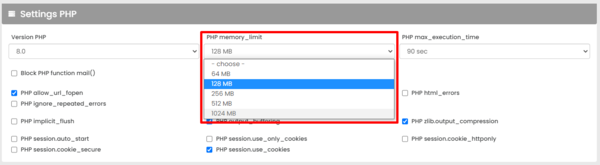
PHP should have enough memory and we shouldn't be getting any error messages now!
#2 - PHP execution time over limit
Following error message can be shown:
fatal error: maximum execution time exceeded
In case any of WordPress error sites is shown, we're going to fix all the common problems.
On some heavy websites PHP scripts can take a long time to finish. In case the execution time exceeds PHP max_execution_time, the script will be shut down.
We're going to go to our hosting settings and set higher PHP max_execution_time.
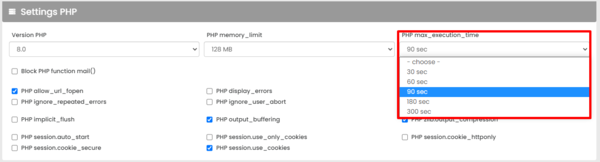
All heavy PHP scripts should now have enough time to run and our problem should be resolved!
#3 - Disabled .htaccess
.htaccess is file used by website authors to control some properties of server (routing, ...)
If .htaccess isn't enabled, the server might not be serve sites other than the home page.
To enable .htaccess, we're going to go to our hosting settings and check "Enable .htaccess".
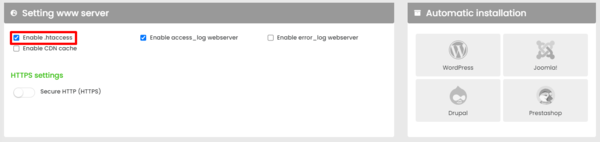
This should fix our problem and our site should be working again!