How to order Compute mode for VPS
Compute mode is a VPS extension suitable for demanding computing solutions (long-term high CPU load; mining, rendering, streaming, ...)
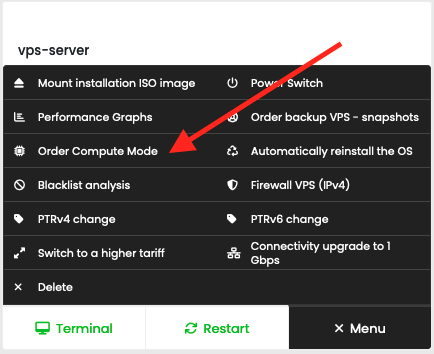
To order the Compute mode additional service for VPS, use the menu item "Order Compute mode" from the menu of your VPS:

In the pop-up window, confirm the order with the "Order Compute mode" button:
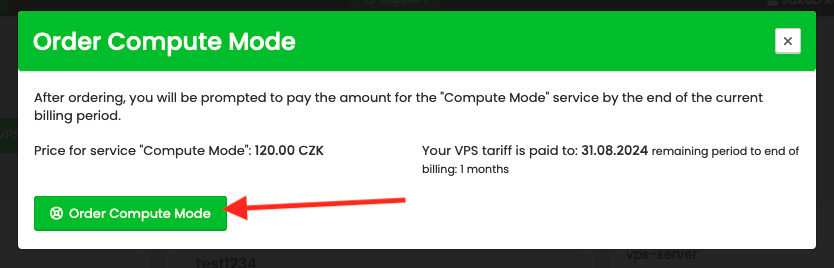
After confirming the order, the system prompts you to pay the amount according to the current billing period of the VSP server. Compute mode for VPS will be ready after payment. To activate it, turn off and on the VPS (Powercycle) so that the extension is properly loaded into the kernel.
To order the Compute mode additional service for VPS, use the menu item "Order Compute mode" from the menu of your VPS:
In the pop-up window, confirm the order with the "Order Compute mode" button:
After confirming the order, the system prompts you to pay the amount according to the current billing period of the VSP server. Compute mode for VPS will be ready after payment. To activate it, turn off and on the VPS (Powercycle) so that the extension is properly loaded into the kernel.