How to switch to a higher tariff with VPS
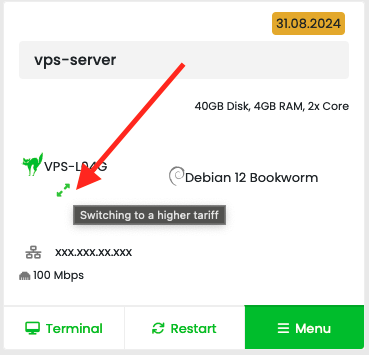
To switch to a higher tariff with VPS, use the double arrow icon next to the name of your current tariff with the label "Transition to a higher tariff" directly at the VPS in the administration of hosting services:
In the box listing of services:
In the tabular view of the list of services:
In the pop-up window, select the desired higher tariff and confirm with the "OK" button: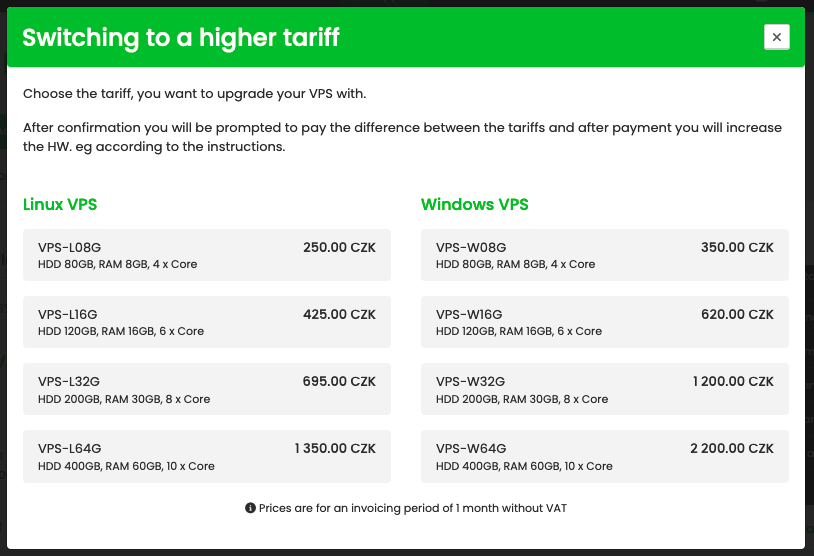
After confirming the order, the system send a call for payment to pay the amount according to the difference between the tariffs until the end of the current valid period of the VPS server. After payment, the VPS will be increased and you will receive a confirmation with the next procedure for loading the new tariff.
In the box listing of services:
In the tabular view of the list of services:
In the pop-up window, select the desired higher tariff and confirm with the "OK" button:
After confirming the order, the system send a call for payment to pay the amount according to the difference between the tariffs until the end of the current valid period of the VPS server. After payment, the VPS will be increased and you will receive a confirmation with the next procedure for loading the new tariff.