
These steps apply to classic Outlook 2019, 2021, 2024 and Outlook from Microsoft 365. If you use the new Outlook for Windows, follow How to set up an email inbox in the new Outlook for Windows.
In Outlook, click File and go to the Info tab.
Click Add Account.
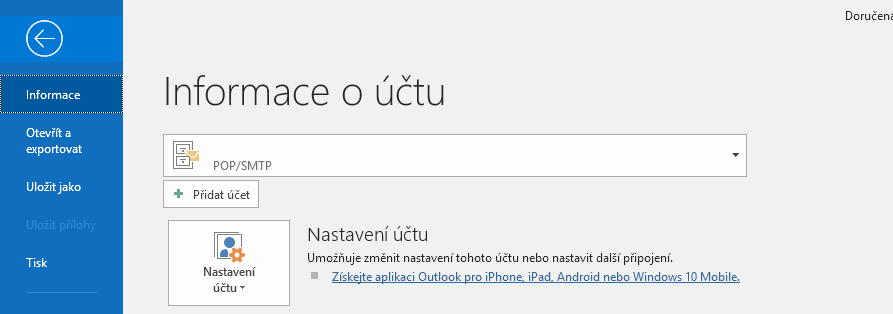
File > Info > Add Account
Enter your email address, e.g. myemail@mydomain.com, expand Advanced options, tick Let me set up my account manually and click Connect.

Entering the email account
In the advanced setup, choose POP, enter mail.hukot.net as the incoming and outgoing mail server, select the encrypted SSL/TLS connection, and enter port 995 for incoming mail and 465 for outgoing mail.
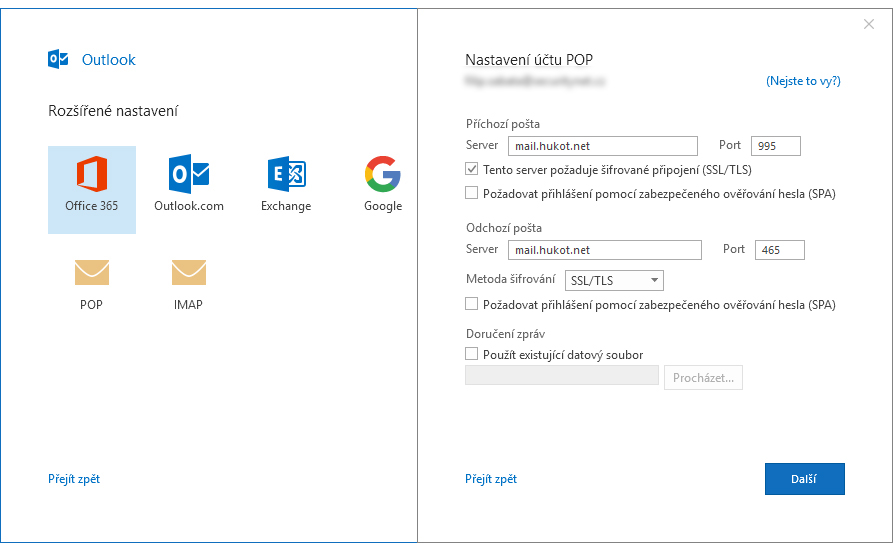
POP connection settings
Enter the password to your mailbox and confirm. If everything went well, the email account is now added to Outlook.